A parent's guide to keeping their voice
How to save your baby's voice and first words
Most families have thousands of photos and almost no recordings of how their child actually sounded at one, two or three. Here is a simple way to catch first words, funny pronunciations and everyday laughs, keep them organized by age, and make sure you can still play them years from now.
The short version. Make recording one tap away where moments actually happen (the kitchen, the stroller, the car), label each clip with the word and your child's age while it is fresh, and keep an offline copy of your audio outside any single phone.
Why phone voice memos and camera rolls rarely work
Default voice recorders were built for meetings, not toddlers. Every clip saves as “New Recording 47” with a calendar date instead of your child's age, and within a month nobody remembers which five-second file holds the way they used to say “pizza” or “spaghetti”.
Videos help, but they are heavy to scroll through and hard to replay in a row. When you want to hear their voice grow over a year, a short audio album organized by word and age is far easier to come back to than four thousand camera-roll thumbnails.
Four habits that actually catch first words
- Put capture one tap from your thumb.Children almost never perform on cue. Keep a recording shortcut on your Home Screen widget, Apple Watch, or the center mic button of a dedicated app so you catch the second time they say a word, not ten seconds too late.
- Record hands-free in the car.Car rides are when toddlers talk nonstop. With Apple CarPlay on iPhone and Android Auto on Android, Tiny Treasures lets you tap record right on your car display while keeping your eyes on the road.
- Save the exact word and age, not a long essay.A two-second clip labeled with the word they said and stamped with their age (like 1y 11m or 2y 3m) is enough. Record the same phrase again a few months later and you can hear their pronunciation evolve in seconds.
- Back up a plain audio copy offline.Phones break and companies change. Export your recordings periodically into a standard audio file stored on your computer or external drive so your child's voice is never trapped inside an app.
How Tiny Treasures keeps a child's voice organized
Tiny Treasures separates your child's own voice from the sealed messages parents and grandparents leave for later, so both jobs stay simple.
- Treasures voice soundboard. Every saved word, laugh or made-up phrase sits on a clean two-column soundboard stamped with your child's age. Tap any age pill to replay it, or tap Play all for a back-to-back mixtape.
- Firsts & Favorites. Keep milestone firsts alongside everyday words without turning parenting into a checklist.
- Story timeline and Calendar. Browse voice words, parent voice memos, photos, short videos and written notes grouped by month and age, or jump to any past date on the calendar.
- Shareable keepsake cards and Birthday Montage. Turn a favorite clip into a 4:5 vertical video keepsake card to text to grandparents, or build a Year in Voices montage for a birthday.
- Zero voice AI, ever. Recordings are never transcribed, analyzed or turned into voiceprints. Read the full limits and architecture on our trust page.
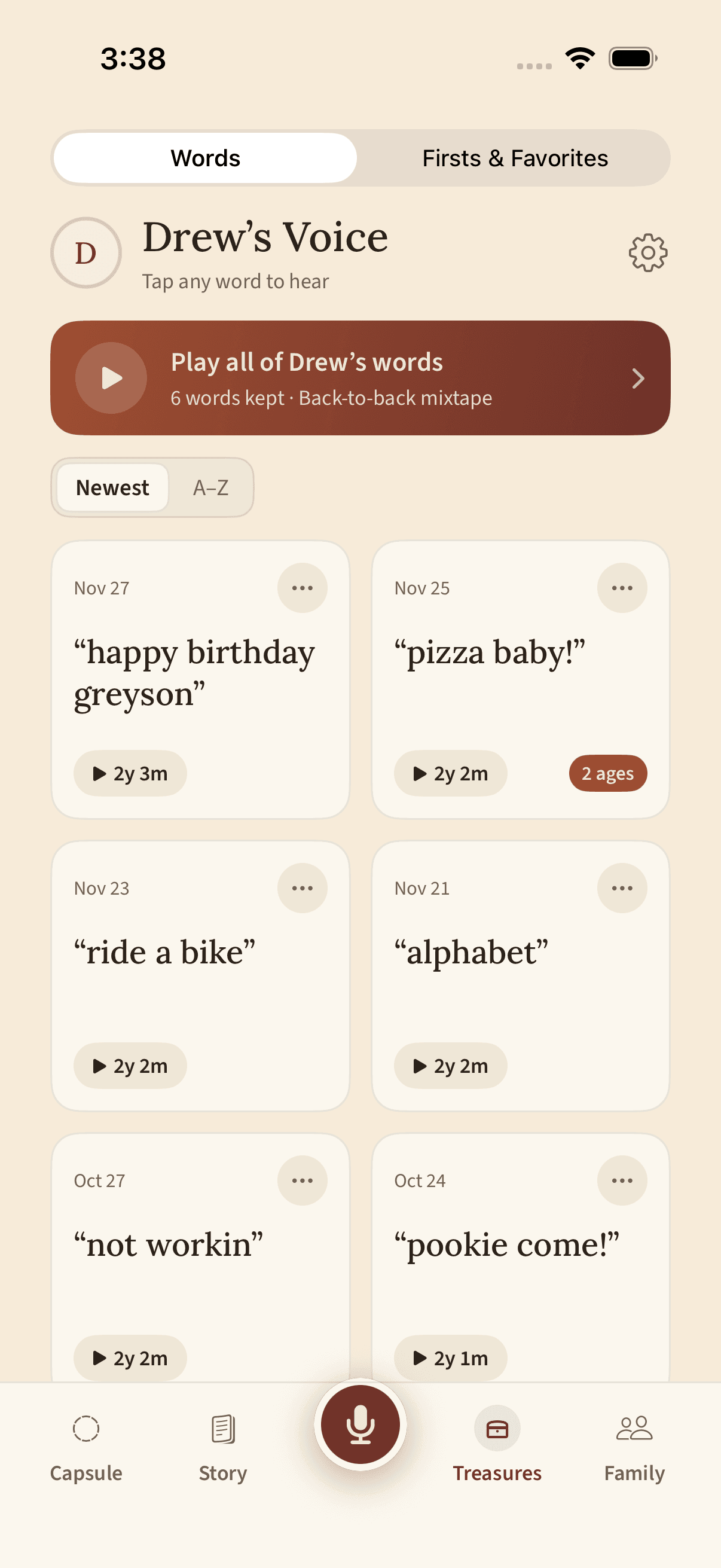
Treasures soundboard: tap any saved word and age pill to hear it back, or play every word in a row.
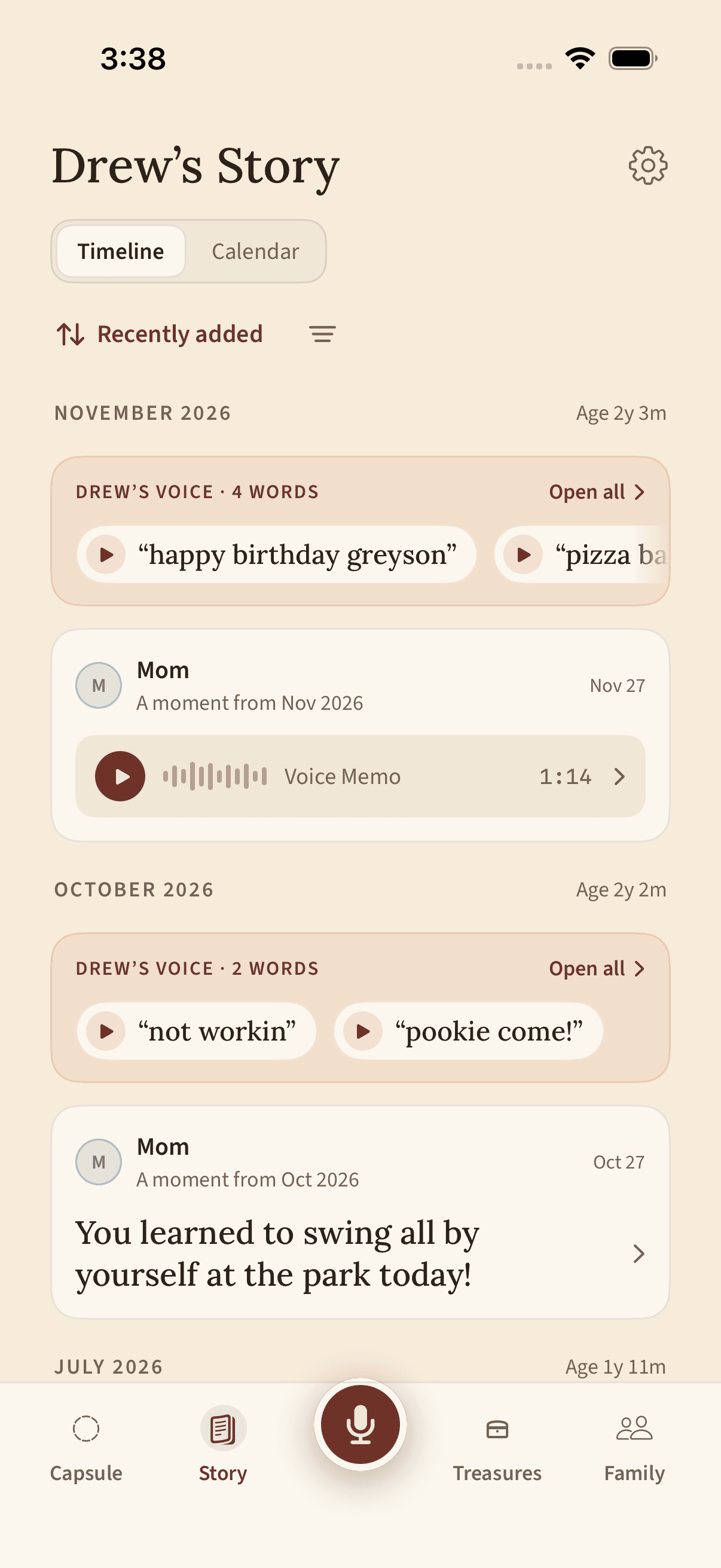
Story scrapbook: your child's words and your family's voice memos together by month and age.
Free for one parent, private when you invite family
Starting a capsule for one child on your own iPhone or Android phone is free and works offline with no account. When you want to sync with a partner or invite grandparents, the Family plan ($29.99/year, $4.99/month or $99 once) covers every child in your family, and grandparents, aunts, uncles and friends never pay.
Want to see every privacy guarantee and every honest limit before you record a single word? Read how Tiny Treasures handles privacy and export, or meet founder Anthony Sallemi on our About page.
Questions people ask
What is the easiest way to catch a baby's first words on audio?
Keep recording one tap away on your lock screen, home screen widget, Apple Watch, or car display. Babies rarely repeat a phrase on cue, so removing the steps between hearing a word and pressing record matters more than studio sound quality. Tiny Treasures puts a dedicated voice capture button on the home bar, supports iOS widgets and Apple Watch, and lets you record hands-free in Apple CarPlay and Android Auto.
Should I save voice clips separately from photos and videos?
Yes. Voice notes buried inside a camera roll or a generic voice memos list quickly lose context, and a long video often hides a two-second word you want to hear again. Keeping short voice clips tagged by the word and your child's exact age lets you replay how they said the same word at 18 months, 2 years and 3 years side by side.
How do I back up my child's voice recordings so they last for decades?
Use a standard audio file format and keep a copy outside any single app or phone. In Tiny Treasures, export is free, works offline with no account, and combines your own recorded messages and your child's saved voice treasures into one chronological audio file that you can store on a computer, external drive or personal cloud.
Can I record my child's voice while driving?
Yes, with hands-free capture. Some of the best toddler phrases happen in the back seat, where picking up a phone is not safe. Tiny Treasures supports Apple CarPlay and Android Auto so a parent can start and save a voice recording from the car screen without touching their phone.
Does Tiny Treasures use AI or speech-to-text on my baby's recordings?
Never. Tiny Treasures has no transcription, no speech-to-text, no voiceprints and no voice analysis anywhere in the app or on our servers. Audio stays audio, and you type the short word label yourself if you want one.
Is Tiny Treasures free if it is just me recording my child's voice?
Yes. Recording for one child on your own phone is free, with no account required. You can save voice memos, photos, written notes and your child's voice treasures, replay them anytime, and export your recordings offline whenever you like.